If you’re a small business owner, a marketing manager at a mid-sized retail chain, or even someone running a co-working space trying to upgrade your on-site communication, you’ve probably stared at a stack of quote sheets for digital signage systems and thought: How do I actually get reliable, professional signage without blowing half my monthly operating budget? As a digital signage supplier who’s been in this game for seven years—talking to hundreds of businesses, troubleshooting mid-install glitches, and walking small teams through first-time setups—I’m here to break down what makes a budget system worth your money, and what to skip at all costs. Digital Signage

First, let’s get one thing straight: “budget” doesn’t have to mean “cheap.” I’ve seen way too many business owners fall for the $200 “digital signage display” they found on a random online marketplace, only to have it die three months in, with no way to get a replacement part or access to a platform that lets them update content without coding. A good budget system balances upfront cost, long-term reliability, ease of use, and scalability—so it grows with your business, not against you.
The biggest mistake I see shoppers make is splitting the system into parts: buying a cheap display from a big-box store, grabbing a random media player, and pairing it with a free, buggy content management system (CMS). That’s a recipe for frustration. The best budget systems are all-in-one: they integrate display, hardware, and software into a single, supported package. No more chasing down support from three different companies when something goes wrong. Let’s break down the non-negotiables to look for, and what to avoid when shopping.
First, hardware matters—especially the display. This isn’t a TV for your living room. Consumer-grade TVs are built for 4-6 hours of daily use, usually for movies or streaming. Digital signage runs 10-12 hours a day, often 7 days a week, showing static content, loops, or occasional dynamic updates. I once worked with a local café that used a 32-inch consumer TV for their daily menu and social media updates; within four months, the panel started flickering and the color washed out. Replacing it cost them $350, which is more than the difference between a reliable signage display and a consumer TV. For small to mid-sized spaces—cafés, gyms, small retail stores, waiting rooms—look for a display rated for at least 8 hours of continuous use, with built-in energy-saving settings. 32-inch to 55-inch sizes are standard for most use cases, and you don’t need to splurge on 4K unless you’re using the display for high-detail content like product catalogs or event posters. 1080p is more than enough for menus, hours of operation, or social media feeds.
Next, the media player. This is the brain of your system: it decodes content, connects to your CMS, and keeps the display running. The worst budget systems use cheap, underpowered players that freeze mid-loop or can’t handle more than a few lines of text. Look for a player with at least 2GB of RAM and 8GB of internal storage—enough to store content for a few days, handle basic media (images, short videos, live feeds like weather or social media), and connect to Wi-Fi or Ethernet. Ethernet is non-negotiable here, by the way. Wi-Fi can work, but if your space has a weak signal, you’ll get lag, dropped content, or interruptions at the worst times—like during a lunch rush when you need to update your daily special. Many budget all-in-one systems include the player pre-installed in the display, so you don’t have to mount a separate box behind the screen, which saves on installation time and eliminates clutter.
Then there’s the CMS—the software you use to upload content, schedule updates, and manage your displays. This is where a lot of budget systems cut corners, and it shows. A good CMS should be cloud-based, so you don’t have to install software on a local computer, and it should have a simple, drag-and-drop interface. No coding, no training videos that are 45 minutes long. I’ve set up systems for a dental office where the front desk admin, who barely uses social media, was able to update the weekly appointment reminder and holiday hours in 2 minutes. That’s the bar. Avoid CMS that charge per display, have hidden fees for basic features like scheduling or remote updates, or make you pay extra for customer support. Most top budget CMS include unlimited displays, basic scheduling, and email support for free or a low monthly fee. A common add-on for growing businesses is multi-location sync, so you can update all your store displays at once, but that’s a bonus, not a necessity for small teams.
Now, what about installation and support? This is the part that makes or breaks a budget system, especially for first-time users. The best budget systems offer simple mounting options—VESA-compatible, which means you can use a standard wall mount that costs $20 at a hardware store, no fancy professional mount required. Some suppliers even include basic wall mounts in the system price, which is a huge perk. Support is non-negotiable. If your display freezes at 7 a.m. on a Monday, when you’re about to open, you need someone to help you fix it fast—no waiting 24 hours for a reply email. Look for systems that offer 24/7 chat support or phone support, even for budget plans. I had a client last quarter who owned three laundromats; on a Sunday night, one of their displays stopped showing the washer availability feed. They messaged our support at 8 p.m., and a technician walked them through a remote reboot in 5 minutes, no downtime for their customers. That’s the kind of support you get when a system is designed for small businesses, not just big enterprises.
Let’s talk about common myths and what to skip. First, don’t buy a system from a supplier that doesn’t offer a 1-year warranty. Even the most reliable budget hardware will have a flaw once in a while, and a warranty means you don’t have to pay for a replacement or repair out of pocket. I’ve had clients buy “no-name” budget systems from overseas that didn’t come with a warranty, and when the display died 4 months in, they were stuck buying a whole new system. Second, don’t overbuy for your space. If you’re a small bakery with one display above the counter, you don’t need a $1,500 55-inch 4K system. A 32-inch 1080p system with a built-in player and basic CMS will do everything you need, for 1/3 the price. Third, don’t ignore scalability. If you plan to add a second display in your store next year, make sure your budget system supports more than one display, so you don’t have to buy a whole new setup later.
So, putting it all together, what is the best budget digital signage system? For most small to mid-sized businesses, that’s an all-in-one, integrated package: a signage-rated display (1080p, 8+ hours daily use), a built-in or included media player with Ethernet connectivity, a cloud-based drag-and-drop CMS with no hidden fees, and at least 1 year of reliable support. Let me give you a real example of a client who made this work. A local chain of 4 fitness studios came to me 18 months ago, looking to replace their old paper schedules and social media feeds with digital signage, but they only had a $2,000 total budget for all 4 studios. We set them up with 4 x 43-inch signage displays, each with a built-in player, and a budget CMS that lets their front desk manager update class schedules, add promotional offers, and display live member check-ins from any phone or laptop. The total cost was $1,850 upfront, plus $15 a month for the CMS. A year and a half later, only one display had a minor issue, which we fixed under warranty in 20 minutes, and they’ve cut their printing costs for schedules and promotions by 70%. That’s the ROI a good budget system delivers.
Now, I’m not going to pretend every budget system is perfect. There are definitely subpar options out there, which is why it’s important to work with a supplier who understands the small business space, not just enterprise-level clients. When you’re shopping, ask these three questions: 1) Is the display rated for commercial use, or is it a consumer TV? 2) Does the CMS charge per display or have hidden fees for basic functions? 3) What kind of support do you offer, and is it available outside 9-to-5 business hours? If the supplier can’t answer those clearly, walk away.
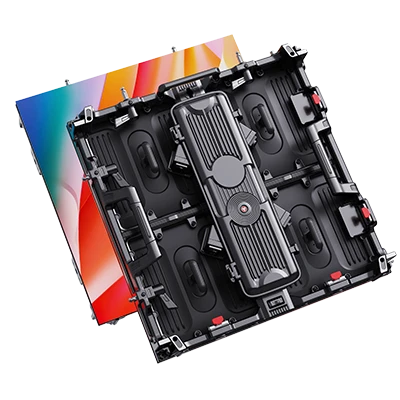
At the end of the day, digital signage is about more than just a screen on the wall. It’s a way to communicate with your customers faster, update content without hassle, and even boost sales—like showing a special offer for a customer waiting in line, or highlighting a new product that’s near the display. The best budget system lets you do all that without stretching your budget or turning into an IT manager. If you’re ready to explore options that fit your space, your team’s needs, and your budget, I’d be happy to walk through the setup, answer any questions, or put together a customized quote for your business. You don’t have to overspend to get a reliable, professional digital signage solution. Just reach out, and we can find the right fit for you.
Indoor LED Display References:
- Digital Signage Association. (2022). "Commercial Display Performance Standards for Digital Signage." Industry Best Practices Report.
- Small Business Administration. (2023). "Budget-Friendly Tech Solutions for Retail and Service Businesses." Small Business Tech Guide.
- Gartner. (2023). "Market Guide for Digital Signage Solutions, Mid-Market and Small Business Segments." Gartner, Inc.
- International Organization for Standardization. (2021). "ISO 9241-210: Ergonomics of Human-System Interaction – Part 210: Human-Centered Design for Interactive Systems." ISO.
- Statista. (2023). "Global Digital Signage Market Segment Breakdown by End User." Statista GmbH.
LiKYLIN (Chongqing) Intelligent Technology Co., Ltd.
As one of the most professional digital signage manufacturers and suppliers in China, we’re featured by quality products and low price. Please rest assured to wholesale advanced digital signage in stock here and get free sample from our factory. We also accept customized orders.
Address: Building 1, No.57, Jinfu Blvd, Gu’nan Street, Qijiang District, Chongqing, China
E-mail: marketing@likylin-led.com
WebSite: https://www.cqlikylinled.com/
